
Introduction
Few scenes capture daily life as beautifully as a quiet moment outside a desi tea stall. The warmth of chai, the buzz of conversation, and the peace of an early morning newspaper — this AI prompt recreates that exact emotion with stunning cinematic realism.
In this guide, you’ll get a ready-to-use AI art prompt, learn how to use it on platforms like Midjourney, Leonardo AI, and Gemini, and discover tips for achieving lifelike portraits that feel like real photography.
The AI Portrait Prompt
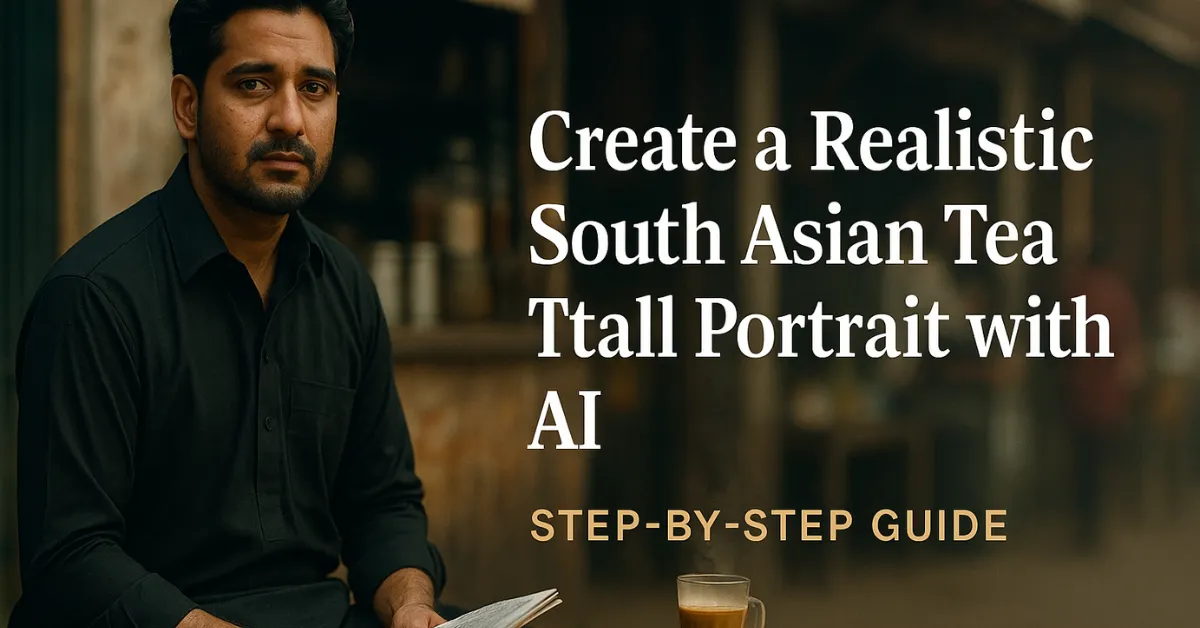
“Ultra-realistic cinematic portrait of the same face from the reference picture, sitting outside a small tea stall. He is wearing a traditional black salwar kameez holding a folded newspaper in one hand, and sitting casually on a simple wooden bench. A steaming cup of chai is placed on the table beside him. The background shows a rustic street tea hotel with a warm desi atmosphere, natural daylight, and subtle hustle and bustle. Full body shot, natural skin tones, detailed clothing.”
What This Prompt Creates
This prompt generates a cinematic South Asian lifestyle portrait that looks like a frame from a realistic movie. It combines the texture of daily life with cinematic lighting and authentic rural/urban street details.
Key Visual Details:
-
Outfit: Traditional black salwar kameez with fabric texture and natural folds
-
Props: Newspaper in one hand, steaming cup of chai on a wooden table
-
Lighting: Soft daylight — realistic shadows and skin tone balance
-
Mood: Calm, cultural, authentic — a desi chai hotel moment in full detail
How to Use This Prompt
1. Midjourney (via Discord)
-
Join the Midjourney server on Discord.
-
Type the command:
-
Add parameters like:
(3:2 gives a balanced portrait frame; “–q 2” increases quality)
-
Generate the image and upscale your favorite version for finer detail.
2. Leonardo AI
-
Visit Leonardo.ai.
-
Open AI Image Generation.
-
Paste the full prompt.
-
Under settings, choose:
-
Model: Photo Realistic or Cinematic Portrait
-
Resolution: 1024×1536 or higher
-
Guidance Scale: Medium (to balance creativity and realism)
-
-
Generate the image and refine lighting or depth using Leonardo’s editing tools.
3. Google Gemini AI
Gemini (Google’s latest multimodal AI) allows natural-language-based image creation — ideal for portrait realism.
How to Use It
-
Visit https://gemini.google.com.
-
Log in with your Google account.
-
In the chat box, type:
-
Gemini will generate the scene with balanced daylight and authentic textures.
-
You can refine it by saying:
-
“Add soft morning sunlight and chai steam effect.”
-
“Enhance fabric detail and natural skin tone.”
-
“Keep the background slightly blurred for cinematic depth.”
-
Bonus Tip
Upload your reference photo and say:
“Use this face as the subject for the cinematic tea stall portrait.”
Gemini will use facial reference matching to maintain subject consistency.
Pro Tips for Cinematic Realism
Use natural tones — avoid high contrast filters
Add “DSLR depth of field” or “bokeh effect” for focus control
Keep desi cultural cues — chai glass, bench, newspaper, and signage
For storytelling visuals, pair this image with a short caption or quote
Also Check: Create a Cinematic Village Night Scene with AI – Complete Guide (Midjourney, Leonardo & Gemini AI)
Why This Prompt Works
This prompt captures emotion through simplicity — no drama, just the warmth of routine life. The blend of traditional clothing, natural daylight, and everyday desi chai culture makes it perfect for artists, photographers, or AI enthusiasts who love realism and human connection in their work.
It’s also ideal for:
-
Cultural storytelling blogs
-
AI photography portfolios
-
YouTube thumbnails
-
Short film or documentary concept art
This AI prompt brings to life a timeless South Asian moment — a man, his chai, and a quiet street. Whether you use Midjourney, Leonardo AI, or Gemini, this setup delivers stunning cinematic results that feel alive.
Try it today and watch your digital art transform into a window into real life — filled with light, warmth, and a touch of nostalgia.