Introduction
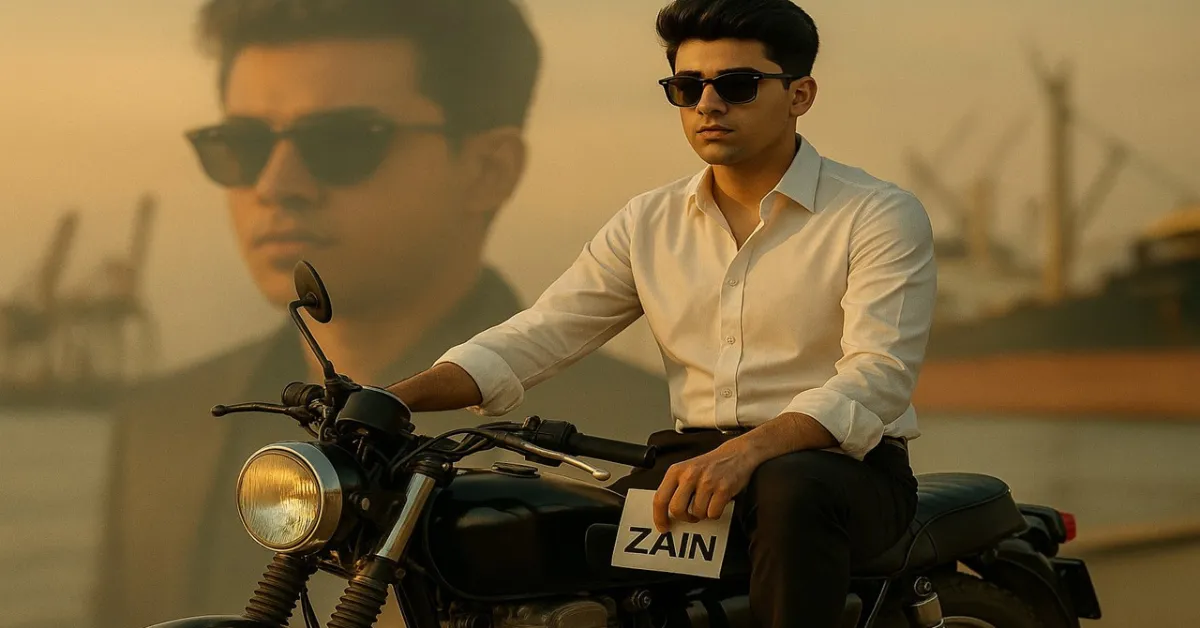
Imagine a cinematic magazine-style portrait — a confident young man sitting on a vintage motorbike, city lights glowing behind him, his style blending luxury and attitude.
This is exactly what this Gemini AI editing prompt helps you create: a hyper-realistic, fashion-inspired photoshoot look, keeping your real face 100% accurate.
If you want to create premium magazine visuals using Gemini AI or Midjourney, this guide will show you how to do it step-by-step.
The Full Gemini Prompt
“A stylish young man (100% same face as the uploaded image) sitting on an old vintage bike, holding a ZAIN sign in the left hand, looking straight ahead with an attitude. He is wearing a white shirt, black pants, casual shoes, and stylish black sunglasses. The setting is a studio portrait with warm lighting, cinematic look, and a ship port in the background. Behind him, a large faded background portrait of the same person wearing sunglasses, giving a premium magazine photoshoot vibe in luxury fashion style. Realistic photo edit, 16K detail, cinematic tone, fashion editorial composition.”
What This Prompt Creates
This prompt generates a high-end cinematic photoshoot portrait that blends vintage attitude with modern style. It keeps your real facial features unchanged while giving a fashion magazine aesthetic — perfect for posters, profile branding, or portfolio covers.
Key Visual Highlights:
-
Outfit: White shirt, black pants, casual shoes, and sleek sunglasses
-
Props: Vintage bike + “ZAIN” element for identity
-
Lighting: Warm studio tones with cinematic shadows
-
Backdrop: Ship port or industrial dock area for storytelling depth
-
Composition: Larger faded portrait in the background — a dramatic artistic element seen in premium editorials
How to Use This Prompt in Gemini AI
Step 1: Go to Gemini
Visit https://gemini.google.com and log in with your Google account.
Step 2: Upload Your Face Reference
Upload your face photo (clear, front-facing, high-quality).
Type this before the main prompt:
“Use this face exactly as it is — do not change facial structure, eyes, or expression.”
Step 3: Paste the Prompt
Now paste the full cinematic prompt provided above.
Gemini will generate a realistic image keeping your face identical while applying lighting, background, and fashion elements as described.
Also Check: Create a 16K Ultra-Realistic Public Speech Portrait Using Gemini AI (Step-by-Step Guide)
Step 4: Fine-Tune Your Output
Once Gemini generates your image, you can refine it with commands like:
-
“Increase cinematic lighting warmth.”
-
“Add lens depth and fashion glow.”
-
“Make background slightly blurred for premium focus.”
Then download your image in 4K or 16K for professional quality.
Optional: Midjourney Method
If you’re using Midjourney (Discord):
Then upload your reference image using the /blend command to ensure face accuracy.
Optional: Leonardo AI
-
Visit Leonardo.ai.
-
Upload your face image.
-
Paste the same prompt.
-
Choose “Cinematic Portrait” or “Fashion Editorial” model.
-
Set resolution to 4096×2732 or higher.
-
Enable Realistic Skin Texture for best results.
Pro Tips for Realism & Style
- Use a warm light source (studio or sunset tone).
- Mention “photo-realistic shadows” and “DSLR depth of field.”
- For luxury look, add: “editorial lighting, premium magazine quality.”
- Keep face angle neutral for best AI alignment with reference.
Also Check: Gemini Editing Prompts: Transform Your Photo into Art
Why This Prompt Works
This prompt merges fashion photography, cinematic tone, and personal branding in one frame.
It creates an image that looks like a Vogue Men editorial or GQ cover shoot — confident, artistic, and 100% realistic.
It’s ideal for:
-
AI photographers
-
Creative professionals
-
Influencers & models
-
Portfolio or social media cover visuals