Introduction
There’s something magical about night rain — the reflections, soft colors, and emotion hidden in each drop.
With Gemini AI, you can now turn a simple photo into a cinematic, ultra-realistic 8K portrait that captures this beauty perfectly.
This guide will show you how to use a real-face-accurate AI prompt to generate a lifelike full-body image — maintaining your exact facial features, proportions, and natural charm while blending them into a cinematic rain scene.
The Gemini AI Prompt
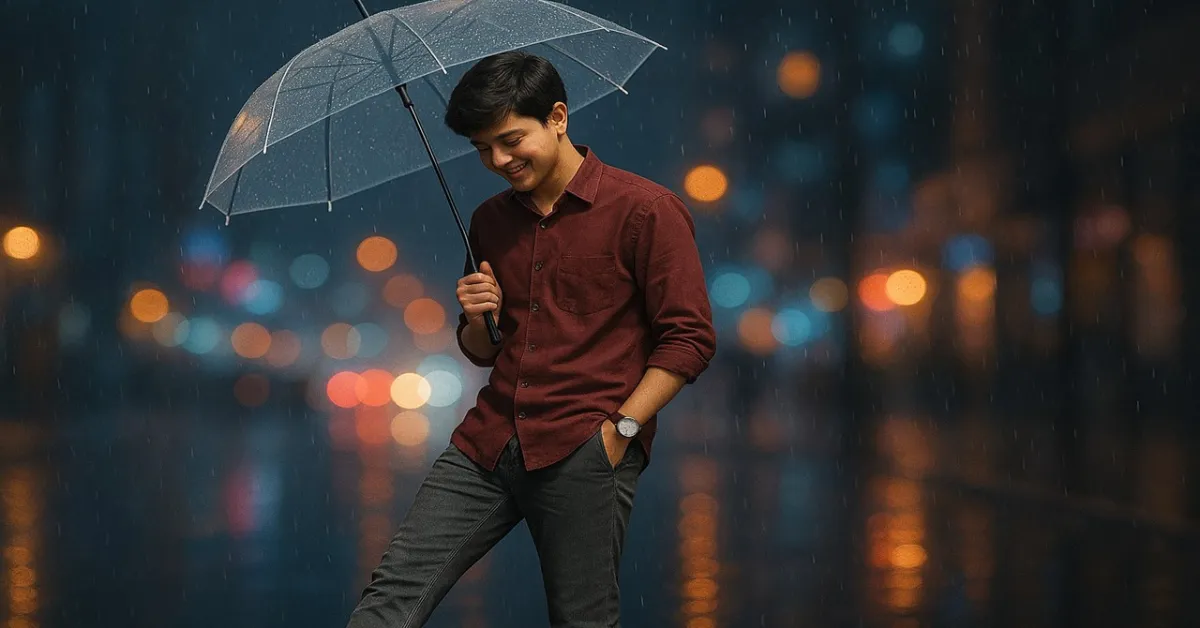
“Create an ultra-realistic 8K full-body portrait of the boy shown in the reference image. Keep the exact facial features, hairstyle naturally suitable to his face, and natural body proportions from the reference image (no changes in physique or facial balance). The boy is standing on a wet street at night during gentle rain, holding a transparent umbrella with his right hand. He is wearing a maroon shirt with sleeves rolled up, grey slim-fit jeans, and white chunky sneakers. His left hand is casually in his pocket, showing a white wristwatch, while his right leg is slightly forward in a playful kicking pose. He has a sweet, natural smile and his head is tilted slightly downward, giving a soft, candid expression. The street surface glistens with reflections of colorful city lights, slightly blurred in the background — neon tones of blue, pink, and amber glowing through light rain. Raindrops and soft bokeh add cinematic depth and realism. Lighting & Style: Night-time cinematic lighting with wet reflections, realistic rain atmosphere with soft backlight, full-body framing, DSLR depth of field, emphasis on texture (wet ground, fabric, umbrella surface), keep natural proportions and overall look consistent with the reference image.”
Visual Style Breakdown
This prompt blends realism, emotion, and cinematic artistry — creating a photo that feels both authentic and dreamlike.
Scene Details
-
Environment: Wet city street at night under soft rainfall
-
Lighting: Cinematic backlight with reflected neon glow (blue, pink, amber tones)
-
Pose: Relaxed and playful — one leg forward, hand in pocket
-
Expression: Sweet smile with subtle downward tilt, natural eye light
-
Texture: Realistic reflections on pavement and fabric grain on clothes
How to Use This Prompt
Step 1: Open Gemini AI
Go to https://gemini.google.com and sign in with your Google account.
Step 2: Upload Your Face Reference
Upload a clear, front-facing photo of the boy (or your own) for accurate facial mapping.
Then type:
“Use this exact face and body type for the next image. Keep proportions identical.”
Step 3: Paste the Prompt
Now paste the full cinematic rain portrait prompt provided above.
Gemini will automatically generate an 8K ultra-realistic portrait keeping your facial features intact.
Also Check: Create a Realistic South Asian Tea Stall Portrait with AI – Step-by-Step Guide ( Gemini )
Step 4: Refine with Natural Commands
If you want slight improvements, you can say:
-
“Add subtle mist and reflection glow on the street.”
-
“Enhance the bokeh lights in the background.”
-
“Make umbrella surface slightly wet and transparent.”
Step 5: Export in 8K
Once satisfied, download the image in .PNG or .WEBP format for maximum texture detail.
Optional: Midjourney Version
If you’re using Midjourney (on Discord):
Then upload your face reference and use the /blend command to ensure accuracy.
Optional: Leonardo AI Version
-
Visit Leonardo.ai.
-
Choose the Photo Realistic or Cinematic Portrait model.
-
Paste the prompt and upload your reference image.
-
Enable:
-
Lighting Quality: High
-
Resolution: 8192×5461 (8K)
-
Camera Depth: DSLR
-
-
Generate and export.
Also Check: Gemini Editing Prompts: Transform Your Photo into Art
Pro Tips for Photorealistic Results
- Use a real, unfiltered reference image (clear front light).
- Avoid over-saturated colors — neon reflections look best slightly blurred.
- Add camera details in the prompt for realism:
“Shot on Sony A7R IV, 50mm f/1.4 lens, cinematic DOF.”
For Gemini, use Advanced mode for better texture and light diffusion.
Why This Prompt Works
This prompt captures the perfect balance of realism and cinematic storytelling.
It’s not just about rain or lighting — it’s about mood. The gentle pose, the umbrella, and the reflective city lights combine to tell a quiet story of youth, peace, and beauty under rain.
Perfect for:
-
AI photographers
-
Digital artists
-
Portfolio visuals
-
Personal branding or album covers